First of all, I find it much more convenient when having to issue commands in a hurry when supervising a channel, to see all the commands available on a menu at a glance, so I have deliberately avoided cascading menus for this reason. This results in a much longer (or taller) menu than originally provided. It is simple to adapt my menu, or Khaled's original menu, to your own needs, and to reintroduce cascading by inserting a dot (.) at the start of a line. Looking at the way these menus are constructed is also a good way to learn how the command structure in IRC works, because there are times when it is necessary to actually use the keyboard.
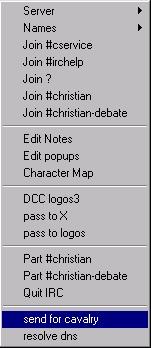
The Status window is the one which loads when your chat browser is started. By default, the options dialogue also opens, but this is closed when you click the connect button.
The first two lines are unaltered, followed by at-a-glance channel join menu calls.
In the next section I have added ability to edit this menu, and to launch the character map which allows foreign language letters to be used in communicating with people from other countries which use them in their alphabets. This section is duplicated in the 'Channel' popup.
The next section allows interchange of passwords with the two bots in my favourite channel, also duplicated in the 'Commands' popup. Perhaps it should be removed from this location for security reasons (please refer to the discussion on security at the bottom of the page)
That is followed by 'leaving channel' commands, and finally the ability to send a request for help to the channel's logos bot in the event of no op being present to resolve a conflict.
This facility which allows you to "send for the cavalry" has been programmed into logos3 by its owner, and a command is here in the status window because if the channel has been taken over and you are refused entry, it provides a needed communication link to advise channel management of a problem. It is also in the channel window popup, where it would be more likely to be needed under normal circumstances.
Right down the bottom is a menu call which allows you to enter an alphabetical ip and use the /dns command within mIRC to discover the associated nurmeric IP. This is useful if you run nukenabber or some similar application, and need to resolve an undernet IP address to place in it's ignore window. The syntax, incidentally, is /dns name.of.service where name.of.service is the reported aplhabetical IP.
First of all, the Channel Window, which is where most of the action takes place... Now we can move on and see the menus available when you right click in other windows.
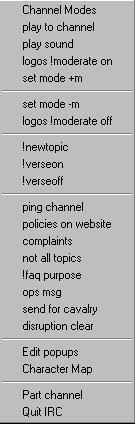
The Channel window is divided into two; there is a strip down the side which lists the people actually in channel. We shall look at that one after this one.
Channel modes dialogue can be viewed by anybody, but only altered by someone actually an op in the channel at the time.
In the next three sections we have some general channel control stuff (as opposed to individual control). The moderate on commands are used in the menu order shown when both bots are in the channel. If logos is out of the channel, voicing needs to be done the hard way, through normal IRC commands; however the basic +m mode-setting command is here.
The reverse order is employed in leaving moderation, as shown. Note that the removal of the + signs against the nicks is done in the nick window under 'multiple devoice' where groups of five can be devoiced at a time.
The posting of topics and verses to channel are logos functions and can be performed by anyone whose password logos has already authenticated. Obviously if logos is out of the channel (for any reason), these items will not work.
Then comes a group of channel related stuff: we start with pinging the entire channel, followed by a posting of a choice of several different notices to channel to assist in maintaining a 'kewl' flow of conversation, and also the standard op to other ops message facility that is an integral part of IRC.
Disruption and part channel messages (as discussed in the status popup) complete this section, although provision is made here for sending the 'disruption cleared' message by an op. Again, if logos is out of channel, this will not work.
Ability to edit the popups file, and to run the windows 'character map' are next, followed by commands for parting the channel and quitting the chat server.
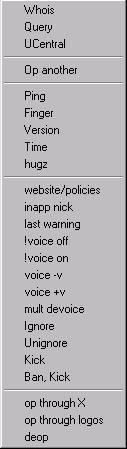
The Names Menu works in the Names portion of the Channel window, and when targeted to a nickname in the speech portion of the Channel window.
We start with a query section which has not been altered from the original.
Then we have a new label on the old "op" item, where one op can invite another to sit at the top of the nick list. This is now called "op another" because op and deop functions and lick and ban functions have been moved further down for convenience.
Below we have the CTCP section expanded without cascading. A 'hugz' greeting where the person's name is enclosed between {{{{{{{{ }}}}}}} completes this section.
Channel policies posting, and moderation on and off facilities through the two available bots follow,
Voicing and de voicing is logically here, because this is the moderation section.
Then the relocated kick and kick+ban sections follow.
Concluding the popup we have the two different ways to op, through logos or through X, both of which requiring the op's password to have already been sent. Right at the bottom is the relocation of the original menu's deop command.
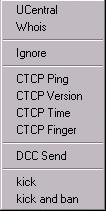
There are not very many additions and/or changes to this section .
Ignore has been added as a safety precaution in case of obnoxious users in a query or private chat window.
The cascading CTCP section has now become a continually visible section.
A kick and/or ban section has been added in case it should be necessary; for example a use could be if the user was being messaged abusively by someone already kicked.
Probably the only really useful commands would be the DCC send, ping, time, and perhaps version ones, hence their becoming readily accessible through no longer cascading.
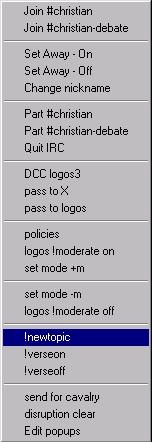
The Commands Menu drops down from the main mIRC menu bar. It is located roughly in the middle between the DCC (Direct Computer Connection) menu and the Windows menu.
First of all we have a section dealing with the joining of my favourite and regular channels.
Then we have an original portion, setting away and changing nickname.
Following this is a section for parting channels and quitting IRC altogether.
Next is a password exchange section for communicating with bots.
Channel policies posting, and moderation on and off facilities through the two available bots follow,
Then topic changing and turning on and off the logos bot's ability to post verses follow. This last is useful in the event that somebody in the channel starts flooding, and can be done on a temporary basis while advising the person to interrogate logos in private.
Finally, another choice of from where a request for the cavalry to be sent (a 'disruption' message) is here, and for the benefit of ops, somewhere from which a 'disruption cleared' message can also be sent. This is followed by a repeat menu call to allow editing of the popups menu.
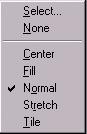
I have not really found a use for this popup, and as there appears to be no entry for it in the popups file, it is still in its pristine 'original' condition!
A point that should also be mentioned is that there is other customisation available within mIRC, some of which can be set within the Options item from the tool bar (also available as Options on the File menu), and some of which you discover often by accident as you use the program!
One of these options is the ability to close any 'active' window by hitting the escape key. A single click on its toolbar button will restore it. These buttons can also be located around any of the four sides of the work area, and can be configured to fill the bar if need be.
Another is the ability, when in a channel window, to use the tab key to complete the nickname of the person you wish to address. You type the first character and then press 'tab' which cycles through the available choices in the channel at that time.
Yet another is the use of the left and right arrow keys to cycle through the text of messages previously sent, for posting a second time.
Some of the toolbar buttons also have right-click menus. Please step back and visit my page about mIRC itself.
Do things before you enter channel
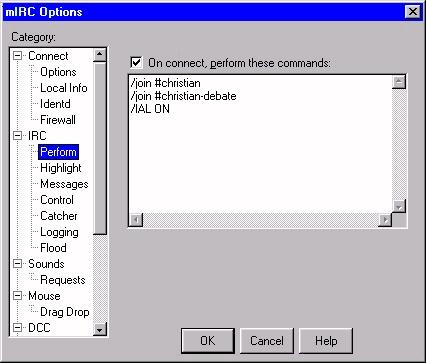
The 'perform' tab (window) of the options dialogue is the one where you can set what mIRC does when you log into a server.
It is suggested that you don't send your passwords to channel bots outside of the channel they are in. The reason is very simple. If the bot is not in the channel, it is likely that it is off-line for some technical reason, or even because of a netsplit. Because some networks (and undernet is one) don't allow nicknames to be "registered", an undesirable and unscrupulous person could be in the channel pretending to be the missing bot, and using its name. If that is the case, that person will know what your password is when you log in. It is worth doing a /whois on the bot on entering before sending an authentication request message.
However, the "perform" dialog is useful, and if you normally log into the same channel or channels - many people are regularly in several at the same time - then the perform box is the place to put the commands.
"Perform" will automatically do whatever you tell it to do as you start mIRC up.
The lines shown instruct mIRC to log into the channel in which I have ops status, as well as another channel which occasionally has interesting topics, and in which I do not have ops status. Other lines could be added to log into other channels, or perform other functions, such as to launch an application: in this case a port protector against malicious attacks against my computer by persons who get a kick out of doing so.
I could perhaps add a world clock application called Geoclock which shows the actual time all over the world, with sun and moon positions, the transition between daylight and darkness, and so on.
The entire procedure is far faster than doing it manually. It is also guaranteed to be the correct syntax every time, without any 'typoze' or other errors!
mIRC is Shareware; have you paid for yours?
Shareware is not Freeware. Some Shareware applications, if not registered within 30 days, become freeware. They tell you so.
Other shareware applications stop running after the 30-day period is up, and some will make it very hard for you to actually use the product after expiry.
The guy who wrote mIRC relies upon your honesty to "do the right thing" and send a very small amount of money to him. It is just ten English pounds. The fee then entitles you to upgrades, and to help or "support". There is also a likelihood that further development on the product will take place if people support the guy financially.
I personally use a number of shareware applications, and if you are interested you can take this link to see what products I personally endorse as being worthwhile. Each one is either genuine freeware, or registered shareware.
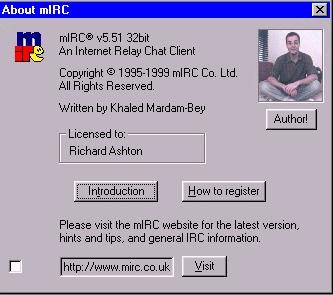
As you can see, my copy of mIRC is registered. Please register yours, so that we may all benefit from Khaled's expertise. Thank you. While the illustration shows it is a slightly earlier version of mIRC, the same menu customisation works in later ones as well.
A final point about customisation of mIRC. This article merely shows how easy it is to customise the window popups. It is actually not the customisation I currently use, because I have taken advantage of other areas of customisation that are available in the original mIRC design. These include servers, channels, notify and url lists, address book, etcetera. As with all customisation, no two people think alike. You may like to go to a page I am currently working on, describing other aspects of mIRC which you can "adjust" to suit your way of operating, whether as a casual or regular guest in channel, or as one of those who supervise what goes on. Have fun as you communicate with others, it is something that we all do very badly :(
updated 13th December 1999